School Nutrition
Evaluate cafeteria checkout, serving-line payment workflows, payment devices, connectivity, reporting, and operational requirements.
K-12 School District Payment Solutions
EZ Pros helps school districts modernize payment acceptance across cafeterias, administrative offices, student fees, activities, events, and parent-facing workflows—with payment security, device governance, implementation planning, and district-wide operational visibility built into the strategy.
Built Around District Stakeholders
A successful K-12 payment environment needs to account for operations, school nutrition, finance, technology, reporting, security, staff responsibilities, and the experience of students and families.
Evaluate cafeteria checkout, serving-line payment workflows, payment devices, connectivity, reporting, and operational requirements.
Review payment costs, student fees, account structure, reconciliation, reporting, and district-level visibility.
Evaluate payment security, P2PE architecture, device governance, connectivity, deployment, and system boundaries.
Plan payment technology across schools and departments while maintaining consistent policies and operational oversight.

District Payment Challenges
School districts often inherit payment environments built one department or location at a time. The result can be inconsistent devices, fragmented reporting, difficult PCI responsibilities, and unnecessary operational complexity.
District Payment Workflows
The payment strategy should reflect the workflow at each location rather than forcing every department into the same checkout model.
Plan secure card-present payment acceptance around high-volume meal-service workflows.
Support administrative and department payment acceptance for fees, programs, activities, and approved charges.
Evaluate hosted checkout, payment links, invoices, and digital payment workflows separately from card-present P2PE.
Support approved mobile payment use cases for athletics, concessions, admissions, and school activities.
Evaluate countertop or fixed checkout for bookstores, spirit shops, merchandise, and student-facing retail.
Support controlled payment acceptance and reporting for district-level administrative operations.
Integration Planning
EZ Pros reviews the current environment before recommending payment technology. The goal is to understand what must remain, where payments originate, how reporting works, and which components can be modernized without unnecessary disruption.
K-12 Payment Security
Eligible EZ Pros card-present payment deployments can incorporate Bluefin PCI-validated point-to-point encryption technology to help protect sensitive payment-card data throughout the applicable P2PE environment.
Bluefin P2PE Manager®
Payment security does not end with encryption. Distributed K-12 environments also need a structured way to track devices, locations, custodians, lifecycle events, and applicable P2PE administration requirements.
Maintain visibility into applicable P2PE device status and lifecycle activity.
Associate devices with applicable schools, locations, users, custodians, and responsibilities.
Support documentation around device receipt, assignment, movement, custody, and lifecycle events.
Support device records, reporting, attestations, and applicable P2PE administration workflows.
Secure Payment Device Options
Device selection should account for payment environment, mobility, connectivity, staff workflow, payment methods, P2PE eligibility, lifecycle management, and deployment needs.

Fixed Checkout
Large-format payment hardware for approved fixed checkout environments where staff benefit from a station-style payment experience.

Mobile & Flexible Checkout
Portable payment hardware for approved workflows that benefit from mobility, contactless acceptance, and flexible payment placement.
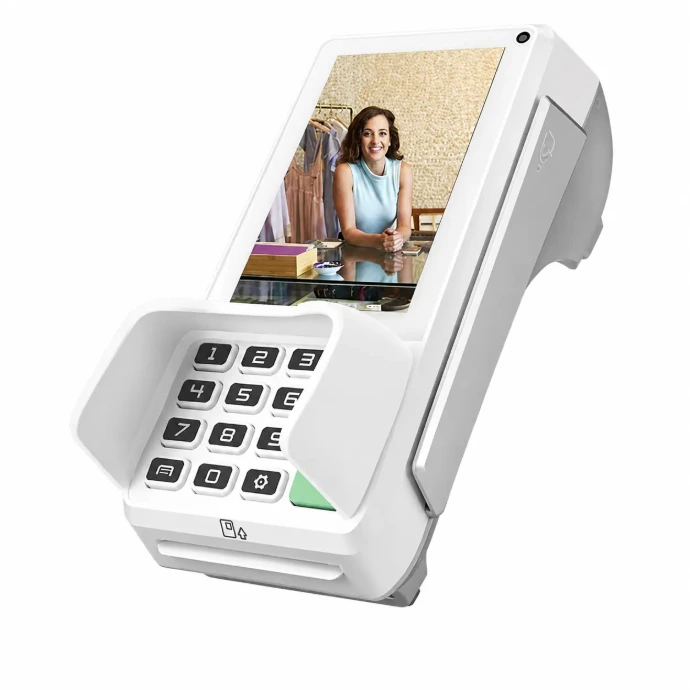
Countertop Payments
Countertop payment hardware for approved fixed office, administrative, and department payment workflows.
District Implementation
District payment modernization should be staged, documented, tested, and aligned with the responsibilities of finance, technology, nutrition, and operational teams.
Map schools, departments, payment channels, and stakeholders.
Review devices, statements, security, reporting, and systems.
Define payment architecture, device strategy, and responsibilities.
Validate workflows before broader district deployment.
Coordinate approved hardware, locations, users, and onboarding.
Maintain device governance and operational payment support.
Security by Payment Channel
P2PE is a card-present security architecture. Parent portals, hosted checkout, eCommerce, and other online payment channels should be evaluated through their own applicable security design.
Eligible in-person payment environments may use approved P2PE devices and Bluefin PCI-validated P2PE technology to protect payment-card data from the point of interaction.
Hosted checkout, payment links, invoices, portals, and eCommerce workflows should be reviewed separately based on the selected gateway, provider, integration, and applicable security requirements.
K-12 Payment FAQ
The assessment begins by documenting the systems and workflows already in place. Compatibility depends on applicable interfaces, provider requirements, payment architecture, and the final implementation design.
PCI-validated point-to-point encryption is a card-present security architecture in which payment-card data is encrypted at an approved payment device and remains protected through the applicable validated P2PE environment.
No. A properly implemented PCI-listed P2PE solution can significantly reduce applicable PCI DSS requirements for eligible environments, but it does not eliminate the organization's PCI DSS responsibilities.
P2PE Manager supports centralized administration of applicable P2PE device information, including device assignments, locations, custody, lifecycle records, reporting, and related program-management activities.
Potentially. Device selection should be based on each approved workflow, connectivity requirement, payment method, processor or gateway support, and P2PE eligibility.
EZ Pros can evaluate hosted checkout, payment links, invoices, gateways, and other parent-facing payment workflows. Online payment security should be evaluated separately from card-present P2PE.
Yes. District or school payment statements can be reviewed for visible rates, fees, gateway charges, equipment costs, account structure, and related payment-processing expenses.
The recommended first step is a district payment assessment covering current systems, payment locations, stakeholders, security requirements, reporting needs, devices, and implementation constraints.
District Payment Assessment
Bring your current payment statement, device list, school workflows, or operational questions. EZ Pros will review where payments happen, what needs to remain in place, and where processing, security, devices, or reporting may be improved.
PCI DSS scope, SAQ eligibility, validation requirements, payment-device availability, P2PE eligibility, processor and gateway support, connectivity, and security outcomes depend on the final payment environment and implementation. Use of a PCI-listed P2PE solution can significantly reduce applicable PCI DSS requirements but does not eliminate PCI DSS responsibilities. PAX product names are trademarks of their respective owner. Bluefin, Decryptx®, and P2PE Manager® are trademarks or product names of their respective owner.
K-12 School District Payment Solutions
EZ Pros helps school districts modernize payment acceptance across cafeterias, administrative offices, student fees, activities, events, and parent-facing workflows—with payment security, device governance, implementation planning, and district-wide operational visibility built into the strategy.
Built Around District Stakeholders
A successful K-12 payment environment needs to account for operations, school nutrition, finance, technology, reporting, security, staff responsibilities, and the experience of students and families.
Evaluate cafeteria checkout, serving-line payment workflows, payment devices, connectivity, reporting, and operational requirements.
Review payment costs, student fees, account structure, reconciliation, reporting, and district-level visibility.
Evaluate payment security, P2PE architecture, device governance, connectivity, deployment, and system boundaries.
Plan payment technology across schools and departments while maintaining consistent policies and operational oversight.
District Payment Challenges
School districts often inherit payment environments built one department or location at a time. The result can be inconsistent devices, fragmented reporting, difficult PCI responsibilities, and unnecessary operational complexity.
District Payment Workflows
The payment strategy should reflect the workflow at each location rather than forcing every department into the same checkout model.
Plan secure card-present payment acceptance around high-volume meal-service workflows.
Support administrative and department payment acceptance for fees, programs, activities, and approved charges.
Evaluate hosted checkout, payment links, invoices, and digital payment workflows separately from card-present P2PE.
Support approved mobile payment use cases for athletics, concessions, admissions, and school activities.
Evaluate countertop or fixed checkout for bookstores, spirit shops, merchandise, and student-facing retail.
Support controlled payment acceptance and reporting for district-level administrative operations.
Integration Planning
EZ Pros reviews the current environment before recommending payment technology. The goal is to understand what must remain, where payments originate, how reporting works, and which components can be modernized without unnecessary disruption.
K-12 Payment Security
Eligible EZ Pros card-present payment deployments can incorporate Bluefin PCI-validated point-to-point encryption technology to help protect sensitive payment-card data throughout the applicable P2PE environment.
Bluefin P2PE Manager®
Payment security does not end with encryption. Distributed K-12 environments also need a structured way to track devices, locations, custodians, lifecycle events, and applicable P2PE administration requirements.
Maintain visibility into applicable P2PE device status and lifecycle activity.
Associate devices with applicable schools, locations, users, custodians, and responsibilities.
Support documentation around device receipt, assignment, movement, custody, and lifecycle events.
Support device records, reporting, attestations, and applicable P2PE administration workflows.
Secure Payment Device Options
Device selection should account for payment environment, mobility, connectivity, staff workflow, payment methods, P2PE eligibility, lifecycle management, and deployment needs.
Fixed Checkout
Large-format payment hardware for approved fixed checkout environments where staff benefit from a station-style payment experience.
Mobile & Flexible Checkout
Portable payment hardware for approved workflows that benefit from mobility, contactless acceptance, and flexible payment placement.
Countertop Payments
Countertop payment hardware for approved fixed office, administrative, and department payment workflows.
District Implementation
District payment modernization should be staged, documented, tested, and aligned with the responsibilities of finance, technology, nutrition, and operational teams.
Map schools, departments, payment channels, and stakeholders.
Review devices, statements, security, reporting, and systems.
Define payment architecture, device strategy, and responsibilities.
Validate workflows before broader district deployment.
Coordinate approved hardware, locations, users, and onboarding.
Maintain device governance and operational payment support.
Security by Payment Channel
P2PE is a card-present security architecture. Parent portals, hosted checkout, eCommerce, and other online payment channels should be evaluated through their own applicable security design.
Eligible in-person payment environments may use approved P2PE devices and Bluefin PCI-validated P2PE technology to protect payment-card data from the point of interaction.
Hosted checkout, payment links, invoices, portals, and eCommerce workflows should be reviewed separately based on the selected gateway, provider, integration, and applicable security requirements.
K-12 Payment FAQ
The assessment begins by documenting the systems and workflows already in place. Compatibility depends on applicable interfaces, provider requirements, payment architecture, and the final implementation design.
PCI-validated point-to-point encryption is a card-present security architecture in which payment-card data is encrypted at an approved payment device and remains protected through the applicable validated P2PE environment.
No. A properly implemented PCI-listed P2PE solution can significantly reduce applicable PCI DSS requirements for eligible environments, but it does not eliminate the organization's PCI DSS responsibilities.
P2PE Manager supports centralized administration of applicable P2PE device information, including device assignments, locations, custody, lifecycle records, reporting, and related program-management activities.
Potentially. Device selection should be based on each approved workflow, connectivity requirement, payment method, processor or gateway support, and P2PE eligibility.
EZ Pros can evaluate hosted checkout, payment links, invoices, gateways, and other parent-facing payment workflows. Online payment security should be evaluated separately from card-present P2PE.
Yes. District or school payment statements can be reviewed for visible rates, fees, gateway charges, equipment costs, account structure, and related payment-processing expenses.
The recommended first step is a district payment assessment covering current systems, payment locations, stakeholders, security requirements, reporting needs, devices, and implementation constraints.
District Payment Assessment
Bring your current payment statement, device list, school workflows, or operational questions. EZ Pros will review where payments happen, what needs to remain in place, and where processing, security, devices, or reporting may be improved.
PCI DSS scope, SAQ eligibility, validation requirements, payment-device availability, P2PE eligibility, processor and gateway support, connectivity, and security outcomes depend on the final payment environment and implementation. Use of a PCI-listed P2PE solution can significantly reduce applicable PCI DSS requirements but does not eliminate PCI DSS responsibilities. PAX product names are trademarks of their respective owner. Bluefin, Decryptx®, and P2PE Manager® are trademarks or product names of their respective owner.